
In today’s world, where traditional cable feels stuck in the past and big-name streaming services often miss the mark globally, Live &TV steps in as a refreshing solution for those hungry for modern entertainment. This isn’t just another IPTV service; it’s like a vibrant portal to a thrilling universe of live content, designed to elevate your viewing habits beyond the usual routine.
Here are some standout features
- Global Channel Access: Get ready to unlock regional, national, and international broadcasts that most mainstream apps won’t touch.
- Real-Time Streaming: When we say “live,” we mean it. With hardly any delay and crystal-clear quality, sports fans and news junkies won’t miss a moment—or a goal.
- Tailored Portals: Users can access a curated experience through portal-based options (like Xtream Codes or M3U playlists & Stalker Portal URL with MAC address), cutting out the clutter and spam.
- Easy Setup: Navigating the setup process can often feel like wandering through a maze, but Live &TV makes it a breeze even if you’re not exactly tech-savvy.
🆓 login Detail & Installation Steps
- Samsung & LG Smart TVs – A Streamer’s Gateway
- Android Boxes (MAG Box) & Android TVs (Free Login Details)
- Amazon Firestick – Smooth Setup for IPTV Streaming (Free Login Details)
- Windows, Mac, and Browsers: No Installation Required (Free Login Details)
Setting up IPTV on your Android box, TV, Amazon Firestick, Smart Tv’s, Windows Laptop, MacBook, Browser & Smart Phone (Android & IOS) is quick and painless. Here’s how you do it.
Samsung & LG Smart TVs – A Streamer’s Gateway
📌 Note: Some newer Samsung, Lg TVs may not list Smart IPTV by default. If it’s not available in your region, you can go for below procedure (quick method).
Step 1: Access the TV’s App Store
- Samsung Smart TV – Open the Samsung Smart Hub
- LG Smart TV – Open the LG Content Store
Step 2: Search for the application
- Search Smart STB application from the app store
- Click Install
- Once done, open the app from your app list
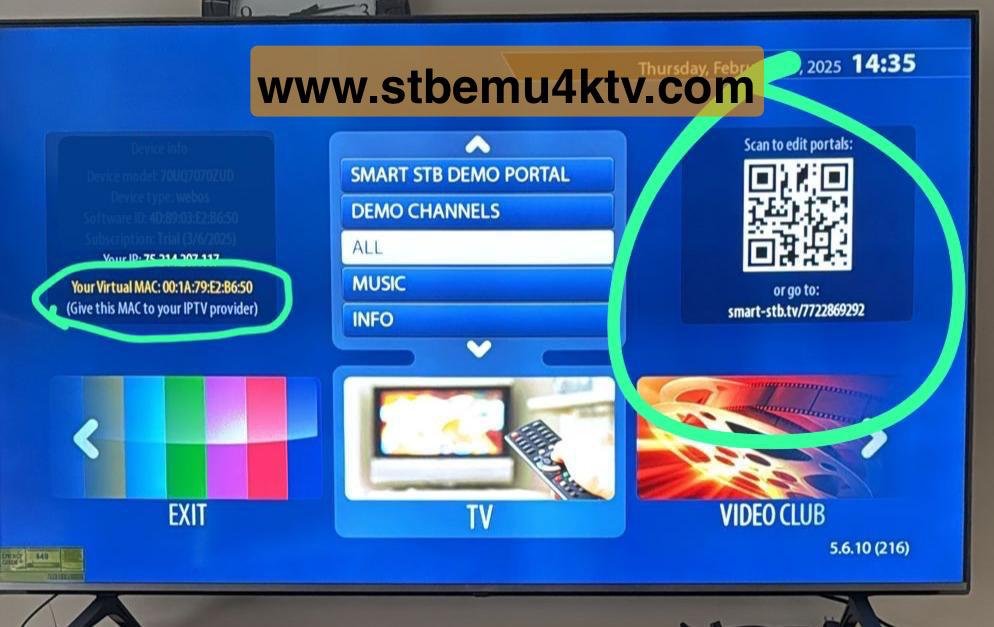
When the app opens, it will display a MAC address on the left side of screen (e.g., 00:1A:79:XX:XX:XX)
Step 3:Share it with your IPTV Provider For Activation
Step 4: Upload IPTV Playlist Using Smart Phone or Laptop:
- Open your Phone Camera, Scar the Barcode showing on the right side of the Screen on Smart Stb & Enter your Portal URL (Your IPTV Provider will give you)
- Click on Update Portal URL

Step 5: Restart the App
- Close the app on your TV, reopen it, and your live channels, movies, and shows will now appear.
🔔 Quick Notes:
- No external box required – everything runs directly on your Smart TV.
- Smart STB apps: require a small one-time activation fee after 7 Days trial (not included IPTV service).
- Works best with stable internet – Wi-Fi or Ethernet recommended.
Android Boxes (MAG Box) & Android TVs
If you’ve got an Android TV or Android box in your home setup, congratulations you already own the perfect gateway to unlock high-quality IPTV streaming. These devices are IPTV’s most compatible allies, offering smooth performance, easy navigation, and support for all the major IPTV apps. But if you don’t already have one, no worries. We’ll also share a few Top-tier Android boxes that work flawlessly with our IPTV service.
- Power On & Connect to Wi-Fi: Make sure your Android box or TV is connected to the internet and signed in to your Google account.
- Open the Google Play Store: Navigate to the Play Store and type in one of the following app names:
- IPTV Smarters Pro
- TiviMate IPTV Player
- XCIPTV Player
- Star Share
- IBO Player
- Download & Install Your Chosen App: Select the app from the search results and install it. These apps are all free to download and use.
- Launch the App: Open the IPTV app once it’s installed. You’ll be asked for login credentials.
- Use the Free Test Login Provided Below: For testing purposes, feel free to use the following credentials (no cost, no commitment)

Any Name: Type your name (any name)
Username: stbemu4ktv
Password: stbemu4ktv.com
Portal URL: http://btx88.pro
- Enjoy the Stream: After logging in, the app will load the full IPTV interface, including live channels, movies, and series. Explore categories, mark favorites, and enjoy your new IPTV world.
Amazon Firestick – Smooth Setup for IPTV Streaming
Setting up IPTV on an Amazon Firestick is surprisingly simple once you know the proper steps. This small but mighty device can handle even high-quality IPTV streams with ease, making it a great choice for those looking to enjoy live TV, movies, and more. Below is your complete guide to getting started.
Step-by-Step Guide: Install IPTV App on Amazon Firestick
- Power On Your Firestick & Connect to Wi-Fi: Make sure your Firestick is properly connected to the internet and working smoothly.
- Enable Developer Options: Navigate to Settings > My Fire TV > About Then, on the About screen:
- Navigate (Highlight) to your device name (e.g., Fire TV Stick 4K)
- Press the OK/Select button on your remote 7 times rapidly
- You will see a message: “You are now a developer!”
- Now go back to Settings > My Fire TV and you’ll see Developer Options
🔹 If Developer Options is not visible, follow the steps above to unlock it manually.
- Enable Required Settings: Go to Developer Options, then:
- Turn ADB Debugging ON
- Turn Apps from Unknown Sources ON
Install the ‘Downloader’ App
- From the home screen, go to Find > Search, and type Downloader
- Install the app from Amazon Appstore
Open Downloader & Enter IPTV App URL
- Launch the Downloader app
- In the URL bar, type 455890
- Press Go and download required application.
Install the IPTV App
Once downloaded, you’ll be prompted to install the app. Click Install, then Done
Launch the IPTV App
Go to Your Apps & Channels, find the new IPTV app, and open it
Enter Your Login Details (Free Account Available)
Use these sample credentials to test the service:
- Any Name: Type your name (any name)
- Username:
stbemu4ktv - Password:
stbemu4ktv.com - Portal URL:
http://btx88.pro
Begin Watching: Your IPTV app will load channels, movies, and live content. Enjoy smooth navigation and streaming.
Windows, Mac, and Browsers(No Installation Required)
Using Windows, Mac, or a browser is one of the easiest ways to access IPTV services. No special hardware is needed—just your computer and a stable internet connection. Whether you’re on a laptop, desktop, or using a browser like Chrome or Safari, IPTV setup is straightforward and lightning-fast.
Here’s how to get started:
Step 1: Visit an Online IPTV Player using below link.
http://webtv.iptvsmarters.com/switchuser.php
Step 2: Enter Playlist Info
- Any Name: Type your name (any name)
- Username:
stbemu4ktv - Password:
stbemu4ktv.com - Portal URL:
http://btx88.pro
Whether you’re on Windows, Mac, or just browsing the web—your IPTV experience is just a few clicks away. Plug in your playlist and dive into non-stop entertainment, anytime, anywhere.
What Makes Live &TV Different?
While most streaming apps can feel like vending machines—spitting out the same titles over and over and trapping you in recommendation loops, Live &TV is more like stepping into a bustling bazaar of live events, where thousands of channels come alive in real-time. It’s designed for those who want their content on their own terms—not just when it’s convenient for the provider. You want it? You get it. Right now.
Picture this: with just your remote, you can zip across continents—catching live sports from Europe, diving into cultural dramas from the Middle East, or tuning into news straight from Asia. Live &TV makes this dream a reality, all from the cozy confines of your own screen.